
- 1、安装posh-git
- 2、安装oh-my-posh(需要科学上网)
- 3、安装文件图标库
- 4、安装Meslo字体(推荐)
- 5、安装PSReadLine
- 6、创建userProfile.ps1
- 7、最终效果图如下
1、安装posh-git
Install-Module posh-git -Scope CurrentUser -Force
要在你的提示符中包含 Git 信息,那么需要导入 posh-git 模块。
Import-Module posh-git
要让 PowerShell 在每次启动时都导入 posh-git,请执行 Add-PoshGitToProfile 命令,它会在你的 $profile 脚本中添加导入语句。 此脚本会在每次打开新的 PowerShell 终端时执行。 注意,存在多个 $profile 脚本。 例如,其中一个是控制台的,另一个则属于 ISE。
Add-PoshGitToProfile -AllHosts
2、安装oh-my-posh(需要科学上网)
winget install JanDeDobbeleer.OhMyPosh -s winget
3、安装文件图标库
Install-Module -Name Terminal-Icons -Repository PSGallery
PS:文件图标库能否正常使用,必须依赖于Nerd Fonts字体。
使用文件图标库,需要在PowerShell配置文件中,增加如下命令:
Import-Module -Name Terminal-Icons
4、安装Meslo字体(推荐)
推荐使用MesloLGM NF字体,点此即可直接下载Meslo字体(v2.3.3)。 下载完成后解压,全选右键点击安装即可自动安装。
5、安装PSReadLine
Install-Module -Name PSReadLine -Scope CurrentUser -Force -SkipPublisherCheck
6、创建userProfile.ps1
Powershell窗口输入命令:notepad.exe $PROFILE 复制以下文本到xxx_Profile.ps1文件
# set PowerShell to UTF-8
[console]::InputEncoding = [console]::OutputEncoding = New-Object System.Text.UTF8Encoding

#Import-Module posh-git
#Import-Module oh-my-posh
#Set-PoshPrompt Paradox
$omp_config = Join-Path $PSScriptRoot ".\takuya.omp.json"
oh-my-posh --init --shell pwsh --config $omp_config | Invoke-Expression

Import-Module -Name Terminal-Icons

# PSReadLine
Set-PSReadLineOption -EditMode Emacs
Set-PSReadLineOption -BellStyle None
Set-PSReadLineKeyHandler -Chord 'Ctrl+d' -Function DeleteChar
Set-PSReadLineOption -PredictionSource History
# 启用自动补全的快捷键(例如,在输入命令时按Tab键)
Set-PSReadLineKeyHandler -Key Tab -Function MenuComplete

# Fzf
# Import-Module PSFzf -Cmdlet fzf
# Set-PsFzfOption -PSReadlineChordReverseHistory 'Ctrl+r'

# Env
#$env:GIT_SSH = "C:\Windows\system32\OpenSSH\ssh.exe"

# Alias
Set-Alias -Name vim -Value nvim
Set-Alias ll ls
# Set-Alias g git
# Set-Alias grep findstr
# Set-Alias tig 'C:\Program Files\Git\usr\bin\tig.exe'
# Set-Alias less 'C:\Program Files\Git\usr\bin\less.exe'

# Utilities
function which ($command) {
  Get-Command -Name $command -ErrorAction SilentlyContinue |
    Select-Object -ExpandProperty Path -ErrorAction SilentlyContinue
}
7、最终效果图如下
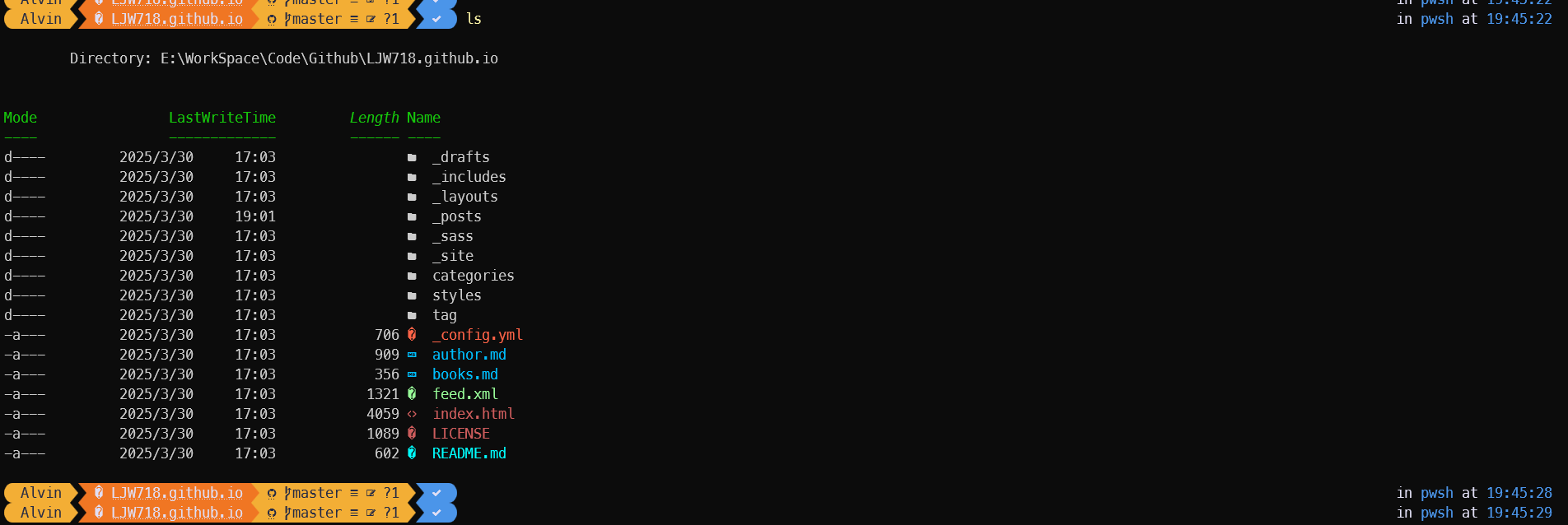
参考: https://blog.csdn.net/weixin_44155966/article/details/142624257
https://blog.csdn.net/ZHOU_YONG915/article/details/129733931